Drums Maker: Drum simulator
- 4.3
- Rating
- 1.00M
- Installs
- Free
- Price
 Analysis by App-foxy
I approached Drums Maker: Drum simulator as a quick way to explore drum sounds rather than as a replacement for a full electronic kit. It is a free music game from TPVapps, built around the simple idea of creating a playable drum set and tapping out rhythms with it. That narrow focus is also its appeal: you can open it when you have a few spare minutes, experiment with beats, and get straight to making sound without learning a complicated production system.
My first impression was that this is aimed at immediate interaction. You are not asked to understand music theory before trying it, and the age rating of Everyone makes it suitable for casual family use as well as personal practice. The app has reached more than a million installs and holds an average rating of 4.3 from roughly 1.7 thousand ratings, so it clearly has an audience beyond people who only want a novelty toy. Still, I think it works best when you understand its limits before expecting a studio-style experience.
Getting from the first tap to a useful beat
I find the most useful next move is to treat a beat as a small experiment: keep its pulse steady, then change one accent and listen for how the feel shifts. That makes it easier to tell whether a variation actually helps, rather than simply making the pattern busier. Once that habit feels natural, the next section looks at how to use those short experiments in everyday situations.
You May Also Like

 Blood Strike: 2.5 Anniversary
Blood Strike’s Loadouts Turn Every Drop Into a Tactical Gamble
A close look at Blood Strike’s custom loadouts: how fast access to signature weapons reshapes its battle royale rhythm, rewards preparation, and narrows the gap between fights.

 Pandora - Music & Podcasts
Pandora’s Music Is Easy to Start, but Harder to Recover
Pandora’s strength is its low-effort path from a seed to a station. Its weak spot is how much confidence it asks you to place in connection, setup, and quiet recovery.

 8 Ball Pool
 Is Built on Rivalries, Rematches, and Routine
A close look at the rivalries, rematches, shared routines, and unanswered safety questions that turn a quick pool match into a persistent mobile community.

 Samsung Music
’s Quiet Strength Is Playing What You Already Own
Its reach comes less from spectacle than from dependable access to a personal library. That simplicity is both the app’s strongest retention engine and its ceiling.

 AccuWeather: Weather Radar
AccuWeather Review: A Quick, Clear Forecast for Everyday Decisions
For everyday plans, the best forecast is the one you can understand quickly. AccuWeather makes rain timing, radar, and local conditions easy to act on, with a few trade-offs.

 Hill Climb Racing
Why Hill Climb Racing Still Turns Crashes Into One More Run
A tiny car, a bumpy hill and one more upgrade: Hill Climb Racing keeps resurfacing because its simple chaos makes every near-miss feel personal.
More From Our News Desk



What to expect when you open it
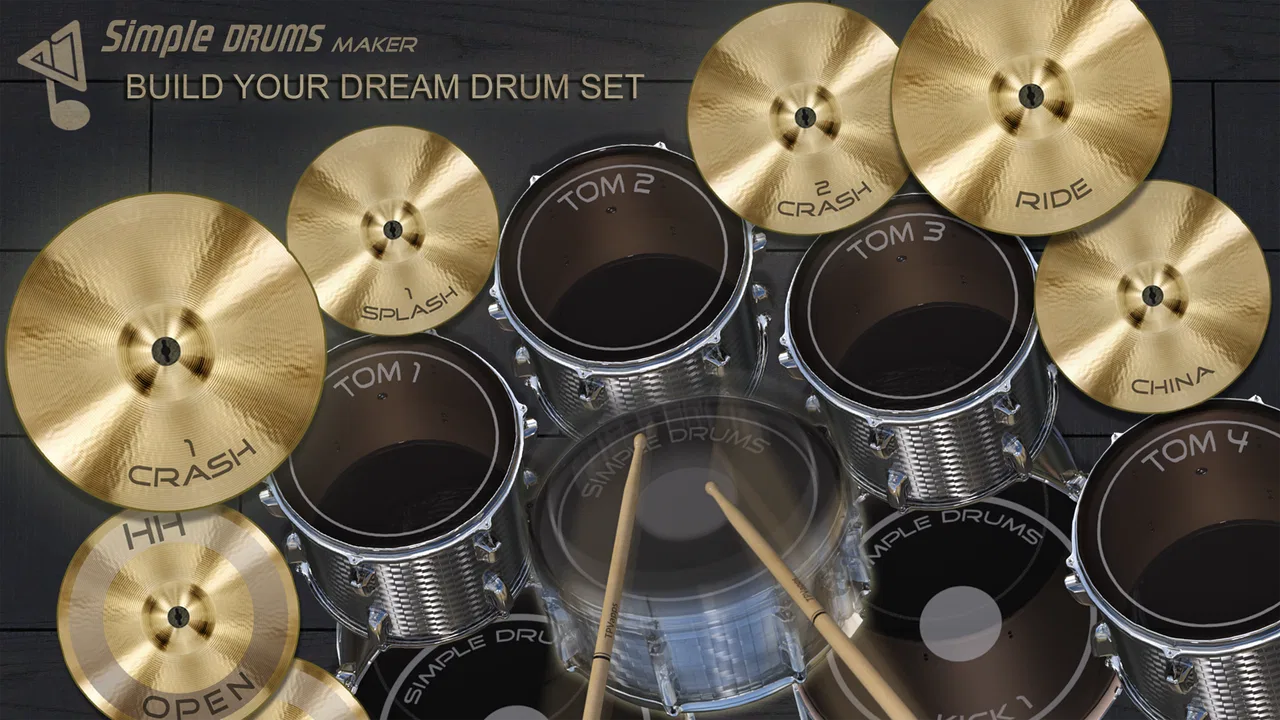
The central experience is hands-on. Instead of browsing a large collection of unrelated instruments, you concentrate on drum playing and on arranging the sounds you want in your own virtual set. The store summary emphasizes high-quality sounds, and that is the part I paid most attention to during use: the value comes from how convincing and responsive the individual drum hits feel when you tap them in sequence.
This is not the kind of music game that depends on a long campaign, character progression, or a stream of challenges. Its satisfaction comes from building a rhythm yourself. That makes it a good fit for someone curious about drumming, a musician looking for a portable rhythm pad, or a parent wanting a straightforward music activity for a child. It is less suitable for anyone searching for a complete recording workstation, a lesson course, or a competitive rhythm game with a fixed scoring system.
The free entry point matters here. You can try the basic experience without paying upfront, while optional in-app purchases are listed at $0.99 per item. I would treat those purchases as something to consider only after you know whether the playing style suits you. The app is more enjoyable when you first learn its basic layout and decide what you actually need, rather than assuming every available option is essential.
Compatibility is also reasonably broad for an older Android device, since the current version 4.9 requires Android 6.0 or later. That does not guarantee identical performance on every phone, but it means many users will not need a recent flagship handset just to try it. On a smaller screen, however, finger placement becomes more important, especially when you want to strike several parts of the set quickly.
Setting up without overthinking it
My advice for a first session is to begin with the default arrangement and resist the temptation to customize everything immediately. The quickest route to understanding the app is to identify the main playing areas, tap each one separately, and listen to the difference between the sounds. This gives you a practical map of the kit before you try to play a pattern.
Use headphones if you are testing the sound quality seriously. Phone speakers can make separate hits blur together, particularly when you play fast. Headphones also make it easier to notice whether your timing is consistent. For a casual experiment, the built-in speaker is perfectly adequate, but a more focused listening setup helps you judge the app fairly.
I also recommend holding the phone in the position that gives your hands the most room before starting a rhythm. A cramped grip can lead to accidental taps and make the app seem less responsive than it really is. If your device has a compact display, use one finger at a time at first. Once you know where each sound is, you can try alternating fingers and using both hands.
The important setup decision is not technical; it is musical. Decide whether you want to imitate a simple beat, practice coordination, or just explore sounds. Each goal changes how you should use the app. A beginner benefits from slow, deliberate taps. Someone testing ideas for a song may prefer to build a short repeating pattern and adjust it by ear. A child may get more from free experimentation than from being told to play correctly.
Your first meaningful success
A realistic first success is not a complicated fill. It is a steady, repeatable pulse that lasts long enough to feel intentional. I suggest starting with one sound as the anchor, then adding a second sound at regular intervals. Once that feels comfortable, introduce another hit sparingly. This approach makes it obvious when your timing slips, and it gives you a small rhythm you can repeat instead of producing a random burst of taps.
One useful exercise is to play a basic pulse with your dominant hand while adding occasional accents with the other. The point is not speed. It is learning how the virtual kit responds when your hands have different jobs. This is where the app can be more useful than simply tapping every part at random: it gives you a low-pressure space to develop coordination and listen to the relationship between sounds.
Another good first-session workflow is to create three contrasting patterns. Make the first sparse, the second busier, and the third somewhere between them. Listen to each one and ask which feels easiest to keep steady. This teaches you a practical lesson about arrangement: adding more hits does not automatically make a beat better. Often, leaving space makes the rhythm clearer.
If you are using it as a sketchpad, keep the pattern short enough to remember. Since this is primarily an interactive drum simulator, I would not rely on it as a full composition archive or assume that every idea will become a finished track inside the app. Instead, use it to discover a groove, then note the rhythm elsewhere if you want to develop it later in another music tool.
Where first-time users can get confused
The biggest source of confusion is expecting the word “simulator” to mean the same thing as a physical electronic drum kit. A phone screen cannot provide the rebound, spacing, or tactile feedback of real pads. You hear the result, but you do not feel the impact of each strike. That makes this useful for rhythm exploration and hand coordination, but not a substitute for practicing realistic stick technique.
Another possible misunderstanding is assuming that a more elaborate set will automatically improve your playing. Customization can make the experience more personal, but it does not solve timing problems. I found it more productive to establish a dependable rhythm with a simple setup before changing the arrangement. Otherwise, it is easy to spend time adjusting the kit while avoiding the musical work of keeping a beat.
Fast tapping can also create a misleading impression. When several hits arrive close together, the phone may feel less precise simply because your fingers are landing near one another or because the display is too small for comfortable two-handed playing. Slow the pattern down and test each area individually before deciding that the response is poor. A larger screen can make a meaningful difference to comfort, even when the app itself is unchanged.
Beginners may also wonder whether they are supposed to follow a hidden correct sequence. I would not approach it that way. Treat the app as an open playing surface: listen, repeat, and refine. If you need structured lessons, notation, guided exercises, or feedback on whether your timing matches a target, a dedicated drumming course or rhythm-training app will probably serve you better.
Practical uses beyond casual tapping
One of the more useful everyday scenarios is a quick idea check. Imagine hearing a rhythm while walking or waiting for an appointment. Rather than trying to remember it mentally, you can open the app and tap the basic shape of the beat. Even if you do not turn that sketch into a finished recording, the exercise helps you decide whether the idea has a pulse worth keeping.
It can also work as a coordination activity during a short break. Start with a simple alternating pattern, then add an accent without increasing the overall speed. This gives your hands a small challenge and encourages you to listen carefully. The benefit is not the number of taps you can produce; it is the ability to maintain a consistent pattern while changing emphasis.
For families, the app offers an approachable way to talk about rhythm. A child can experiment freely, while an adult can suggest copying a clapping pattern or matching a song’s general pulse. Because there is no need to begin with formal notation, it lowers the barrier to trying percussion. I would still supervise younger users around optional purchases, especially if the device is shared.
It may even help a songwriter test the character of an arrangement. A sparse beat can suggest a relaxed section, while a denser pattern can make an idea feel more energetic. The important trade-off is that the app is better at testing the rhythmic skeleton than at completing the whole production. For melodies, harmony, mixing, and polished recording, you will need a different tool.
How it compares with the usual alternatives
Compared with tapping on a table or using a generic metronome, this app gives the rhythm more character because different drum sounds respond to your choices. A metronome is better when your only goal is strict tempo practice, but it does not offer the same sense of building a small kit. Table tapping provides natural physical feedback, yet it cannot let you switch between distinct drum voices.
Compared with a full digital audio workstation, Drums Maker: Drum simulator is much easier to approach. You can focus on playing instead of navigating tracks, effects, editing panels, and recording workflows. That simplicity is its strongest advantage for a first-time user. The downside is that a workstation gives you far more control over arranging, saving, processing, and combining parts, so serious production work belongs there.
Compared with a physical practice pad or electronic kit, the app wins on portability and cost of entry. You can try it with a compatible Android device rather than buying dedicated hardware. The compromise is physical realism. If your goal is to improve stick control, develop foot coordination, or rehearse with the feel of a real kit, hardware remains the better choice.
Compared with a rhythm game built around songs and scores, this is more open-ended. You are not primarily being judged against a fixed track; you are shaping the beat yourself. That is liberating for experimentation but less motivating for players who need levels, targets, or a clear sense of progression. Choosing between them depends on whether you want creative control or structured challenge.
Who should use it, and who should skip it
I would recommend it to curious beginners, casual players who enjoy music-focused games, and musicians who want a fast way to test a rhythmic idea. It is particularly approachable if you have never touched a drum kit and want to learn how different hits can work together before committing to lessons or equipment.
It is also a sensible choice for short sessions. You can use it for a few minutes without preparing a project or setting aside a large block of time. That makes it more practical than a complex music application when the goal is simply to explore a groove during a break.
I would skip it if you need professional recording controls, realistic hardware technique, detailed timing analysis, or a lesson plan. I would also look elsewhere if your main motivation is unlocking levels and competing for scores. The app’s open playing style will feel limited rather than relaxing if you are waiting for a more formal game structure.
What changes the experience over time
After the first successful beat, the next step is to become more deliberate. Try changing only one element at a time: keep the pulse steady while moving an accent, then keep the accent while simplifying the rest. This makes your experiments easier to evaluate. If you change everything at once, you may create a different rhythm, but you will not know which choice improved it.
Use the customization idea carefully. A personal drum set can make the app feel more engaging, yet consistency is valuable when you are learning. Staying with one arrangement for several sessions lets your fingers build a reliable mental map. Change it when you have a reason, such as testing a different sound relationship, not simply because a new layout looks interesting.
For users considering an optional purchase at $0.99 per item, my practical rule is to wait until the free experience has revealed a specific need. If you cannot explain what the purchase would improve in your own workflow, keep practicing with what you already have. The app is most convincing when the interaction itself is enough to make you want another session.
TPVapps has kept the product focused around accessible drum playing, and the current version 4.9 remains a straightforward recommendation for that particular purpose. Its strong points are immediacy, portability, and a low-pressure way to experiment with rhythm. Its weaknesses are equally clear: a touchscreen cannot replace physical pads, and an open simulator cannot provide the structure of lessons or the depth of a production suite.
My final view is that this is worth trying if you want a friendly first step into drumming or a compact rhythm sketchpad. Start slowly, learn the playing areas, build one steady pattern, and only then explore customization. If that process feels satisfying, the app has done exactly what it needs to do. If you quickly find yourself wanting recording, instruction, or realistic hardware response, that is a useful result too: you have learned which kind of music tool should come next.
FAQs for Drums Maker: Drum simulator
01What is Drums Maker: Drum simulator?
Drums Maker: Drum simulator is a mobile drumming app designed to let you play a virtual drum kit directly on your Android or iOS device. It typically provides touch-sensitive pads representing drums and cymbals, allowing you to tap out rhythms, practice basic patterns, and experiment with different sounds. It is aimed at beginners, casual players, and music fans who want a portable drumming experience.
02Is Drums Maker: Drum simulator suitable for beginners?
Yes, the app is generally suitable for beginners because its controls are straightforward and based on tapping the displayed drum components. New users can learn where the kick, snare, toms, hi-hat, and cymbals are positioned before attempting more complicated rhythms. However, it should be viewed as a practice and entertainment tool rather than a complete replacement for lessons on a physical acoustic or electronic drum kit.
03Does Drums Maker: Drum simulator work offline?
The core drumming experience may be available without a constant internet connection, which makes the app convenient for practicing while traveling or when mobile data is limited. Nevertheless, some features can depend on internet access, including advertisements, updates, additional content, or external links. It is a good idea to open the app once while connected and check which instruments and functions remain accessible offline.
04Is Drums Maker: Drum simulator free to download and use?
The application can generally be downloaded without an upfront purchase, but free versions of mobile music apps may include advertising, optional purchases, or limitations on certain sounds and features. Before installing, users should review the store listing for current pricing details, in-app purchase information, and subscription terms. Availability and monetization can vary depending on the platform, country, and future app updates.
05What devices and permissions does Drums Maker: Drum simulator require?
Drums Maker: Drum simulator is intended for compatible Android and iOS smartphones or tablets, although the exact operating-system requirements may change with updates. A device with a responsive touchscreen and speakers or headphones will provide the best experience. The app may request permissions related to audio, notifications, or advertising services, so users should review each permission carefully and only allow access that seems necessary.
Pros
- Responsive touch controls make basic rhythms easy to play.
- Includes varied drum sounds for experimenting with different beats.
- Useful for casual practice without needing a physical drum kit.
- Quick to launch and suitable for short creative sessions.
- Simple interface is approachable for beginners and younger users.
Cons
- Advanced drummers may find the available features too limited.
- Small screens can make fast
- accurate playing difficult.
- Extended sessions may become repetitive without deeper customization.
- Sound quality depends heavily on the device’s speakers or headphones.
- Touch input may feel less natural than playing real drum hardware.

Drums Maker: Drum simulator
Gallery